
If the LiteGait is pulling heavily in one direction when the directional locks are engaged, please follow the steps outlined below to identify the most effective solution for your situation.
Directional Lock Casters
The directional casters are used to help stabilize the LiteGait and minimize lateral movement that may occur due to the patient's shifting weight, a perfectly straight path is not guaranteed. Factors like unweighted casters, uneven flooring, slipping, and so on can affect the linear path. This is normal.
In an ideal scenario, when both directional locks are engaged, the acceptable deviation from a straight path over a distance of 10 feet is 4 inches. However, it is important to recognize that various factors can influence this measurement.
Symptoms:
-
LiteGait will not roll in a straight path
- The LiteGait pulls more in one direction
- The casters are slipping
Step-by-Step Troubleshooting:
For a brief overview of the directional lock casters function, please review the following video:
Directional casters are used on LiteGait to reduce the sway induced by patient movements. However, this does not guarantee that the LiteGait rolls straight; some deviation is inherent and acceptable.
Test the load on all four casters
-
-
The LiteGait caster wheels may experience slipping, which can lead to the unit pulling heavily to one side when the directional locks are engaged, making it difficult to maneuver the unit effectively.
-
Watch an example of slipping casters in this video.
The back part of the LiteGait legs swing to the left (user’s right).
One possible explanation for the slipping observed in this video example is that the user may not be properly secured in the harness, which could result in insufficient load being applied to the casters.
An unloaded caster may lead to challenges in steering the unit effectively. It's important to note that maneuvering the LiteGait without a load does not yield the same performance as when it is fully loaded.
-
-
Check that all four casters are equally loaded.
- For this test, it is recommended to have a colleague or patient assist you. Ensure that they are safely and properly secured in the LiteGait harness to provide the required load for accurate assessment.
- Maneuver the loaded LiteGait across the floor for a short distance, both forward and backward, and observe whether all wheels maintain contact with the floor.
-
Q1: Do all four wheels touch the floor when the LiteGait is loaded?
-
-
- If one or multiple wheels are not touching the floor when the unit is loaded, please reach out to service@litegait.com for the next steps.
- If all wheels maintain contact with the floor, move to the next step. A load will be required for the next steps.
-
To improve steering, leave the directional lock caster on the heavy end of the LiteGait unlocked
LiteGait trainers recommend using the directional lock caster on the heavy end of the unit unlocked if the deviation is more than desired. This adjustment can enhance your ability to steer the LiteGait effectively as you pull or push it.

For more information, tips, and recommendations for LiteGait practical use, our education team can reach out to assist.
Test the caster alignment
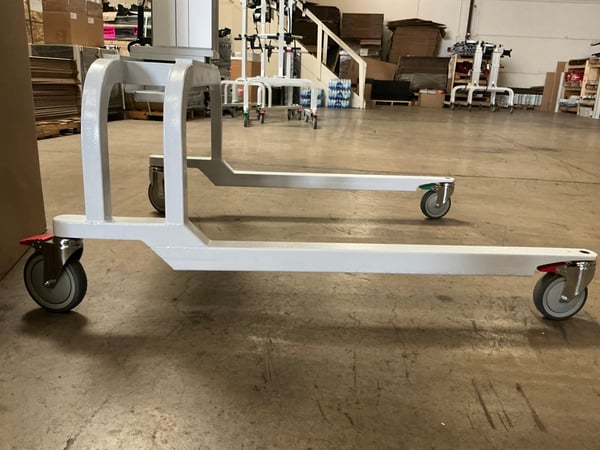
The directional lock casters’ alignment should be checked if you observe a significant deviation within 3ft when both directional locks are engaged.
In an ideal scenario, the acceptable deviation over 3ft is approximately 1.5 inches. As mentioned earlier, this measurement can be affected by multiple factors. An excess in deviation is normal, but an immediate shift in direction needs to be investigated.
-
-
If you observe a significant deviation within 3ft along a straight line when both directional locks are engaged, please make a note of the deviation and try to recreate the issue on several floors.
- Test the caster alignment by rolling the LiteGait along a straight line. Carefully monitor and measure changes in deviation at 3ft, 6ft, and 10ft.
-
Q:1 Is the deviation consistent on all flooring?
Q:2 What is the measurement of the deviation within 3ft, 6ft, 10ft?
-
- If the deviation is significant enough within the first 3 feet, the caster alignment needs to be adjusted. See the instructions for your specific base and hardware style below. Included in the instructions is a section for aligning the caster to the base. (Click on the file icon to view the instructions).
We recommend a biomed or maintenance team to assist with this step. If necessary we can assist in finding a third party. If the unit is under warranty, Mobility Research will cover the repair.
-
- Low profile Base 📄

-
- High-low Base 📄
-
- Standard Base 📄

-
- Pediatric Base 📄

If the suggestions provided in this article do not resolve the issue your LiteGait is experiencing, please contact the service team.
Requesting Service Support
For the Service team to properly assist you with:
-
-
Equipment Support
-
Warranty Support
-
Please provide:
-
- A clear description of the symptoms affecting the LiteGait unit
-
- The serial number of the LiteGait unit:
-
-
-
The LiteGait serial number is located on the base of the unit and may appear in one of the following formats:
- LGXXXX-XXXX
- LGXXXX-XXXXX
- XX-XXXX
- LGXXXXX-XXXX
- 2XXXX
-
-

-
-
- If you are unable to locate the serial number, please provide clear photos of the LiteGait unit.
-
Contact Information for Support requests:
- Phone: 602-731-3132
- Email: Service@litegait.com
- Open a Service Ticket: https://litegait.com/page/service-contact-us
- Schedule a Support Call on the Service Calendar