
The most common issue with LiteGait is a bad or failing battery, which has a limited service life of 24 to 30 months. To ensure the longevity of the battery, it is recommended to charge it at least once a week for 6-8 hours.
The initial step in diagnosing a bad or failing battery is determining its age.
Symptoms:
- LiteGait will not turn on even after charging the battery.
- Battery appears charged (indicator lights on charger or unit), but there is no movement when trying to lift.
- Unit powers on but moves significantly slower than normal.
- Battery doesn’t keep a charge.
- Clicking, buzzing or beeping from the unit when trying to activate the lift.
Step-by-step Troubleshooting
Check the battery’s age by locating the stamped date on its part number label.
-
-
Each LiteGait battery is labeled with its manufactured date (indicating battery age) and its specific battery part code.
-

If the battery is older than 24 months and the unit is experiencing power issues, we recommend replacing it.
If the battery is less than 24-30 months old
-
-
The LiteGait battery is covered by a 90‑day warranty from the date of purchase.
-
After the initial warranty has expired, Mobility Research offers a pro-rated warranty for a replacement if the battery fails before the expected 24-30 month service life.
-
If the battery is less than 24 months old and your LiteGait is experiencing power issues, continue with the steps below.
To replace the battery, note the Part Code on the battery part label. Locate that part code at this LINK and you can purchase it from that page, or request a quote.
Evaluate the battery and charger together to confirm proper charging functionality
For PSSLD/PSSMX battery and charger:


The PSSLD/PSSMX charger uses an LED to indicate status

When the charger is plugged into a wall outlet and not connected to the battery, the LED should be green, indicating that the charger is powered.
-
- If the LED is green when the charger is plugged into a wall outlet, connect the charging plug to the battery charging port. Once connected, the LED should change to red to indicate that the battery is actively charging, and it will return to green when the battery has reached a full charge.


-
- A healthy battery will be fully charged in approximately 6-8 hours when it is fully depleted.
- If the LED is red when the charger is not connected to the battery; if the LED does not illuminate when the charger is connected or disconnected to the battery; if the LED flickers at any time, the charger should be replaced.
If your LiteGait has the Smart Controller (like the image below), you can further assess the state of your battery by following this LINK.

If your Control Box looks like the image below, and charge the battery through the control box using an AC cord:
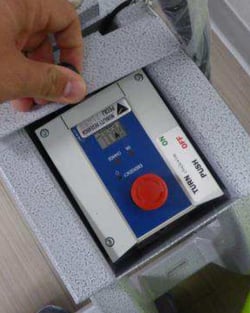

The control box for your LiteGait features a pair of LEDs that indicate a status and will help troubleshoot. This system will make an audible buzz or beep that indicates that the battery voltage is too low to operate the lift. If you hear this sound, replace the battery. If you do not hear the sound, continue with the following steps.

The green ON LED will illuminate only when the AC cord is connected to a wall outlet, indicating that the unit is in charging mode. During charging, the LiteGait cannot be operated: all control box functions are disabled and the battery capacity indicator will not display the charge level.
If the ON LED is not illuminated, try a different outlet.
If the ON LED does not display a green light after switching outlets, the control box or the AC cord may be faulty and should be replaced.
When the AC cord is connected to a wall outlet and the battery is charging, the orange CHARGE LED should remain illuminated to indicate active charging. The LED will turn off once the battery has reached a full charge, signaling that the charging cycle is complete.
A fully charged battery and a failing battery will make the orange LED switch on and off briefly when the A/C cord is plugged in to charge.
To test the battery, operate the lift once you have confirmed that the E‑Stop button is released and the control box AC power cord is disconnected from the wall outlet.

If the AC cord is connected to a wall outlet, the control box will not display the battery level and all functions are disabled when the system is in charging mode.

When the battery has a charge and is connected to the control box properly, the capacity indicator should show solid black bars indicating a charge.
If the battery level indicator initially displays full bars but drops significantly after one or several lift operations, or if the bars disappear when attempting to operate the lift, this strongly suggests that the battery is failing and likely needs to be replaced.
If the battery capacity indicator does not display solid black bars, the battery may not be recognized by the control box (verify that all battery and control box connections are secure), or the battery voltage may be insufficient and the battery likely needs to be replaced.
Requesting Service Support
For the Service team to properly assist you with:
-
-
A replacement battery quote
-
Equipment Support
-
Warranty Support
-
Please provide:
-
-
A clear description of the power-related symptoms affecting the LiteGait unit
- The model (part code) of the battery
- The manufactured date of the battery
- The serial number of the LiteGait unit:
-
The LiteGait serial number is located on the base of the unit and may appear in one of the following formats:
- LGXXXX-XXXX
- LGXXXX-XXXXX
- XX-XXXX
- LGXXXXX-XXXX
- 2XXXX
-
-

-
- If you are unable to locate the serial number, provide clear photos of the LiteGait unit and its power components (battery, control box, charger, and hand control).
Contact Information for Support requests:
- Phone: 602-731-3132
- Email: Service@litegait.com
- Open a Service Ticket: https://litegait.com/page/service-contact-us
- Schedule a Support Call on the Service Calendar